Hello Team,
I attempted my first practice test today. After submitting the test, I accidentally refreshed the page and was redirected away from the review screen.
Since then, I am unable to:
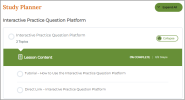
find the Dashboard, or
access the review of my submitted answers and explanations for that attempt.
Could you please let me know:
If there is a way to access the review for a submitted test after refresh, and
Where I can find the Dashboard/Test History on a tablet interface?
Your guidance would be really helpful, as reviewing explanations is critical for learning.
Thank you for your support.
I attempted my first practice test today. After submitting the test, I accidentally refreshed the page and was redirected away from the review screen.
Since then, I am unable to:
find the Dashboard, or
access the review of my submitted answers and explanations for that attempt.
Could you please let me know:
If there is a way to access the review for a submitted test after refresh, and
Where I can find the Dashboard/Test History on a tablet interface?
Your guidance would be really helpful, as reviewing explanations is critical for learning.
Thank you for your support.