Course How Do I Get Started With My Purchased Materials?

FRM part 2 credit risk book has this chapter called “structured credit risk”, which is very crucial in understanding structured products. However, I don’t see any material, notes, and instructions video on this chapter.

Most importantly, The 2025 part 2 curriculum updates you all posted in the forum are very hard to follow and understand. I have no idea which chapter is covered and which chapter is not covered in bionic turtle study planner. Lots of my peers and study buddy also reported that they don’t understand the overall structure of bionic turtle study planner and had a hard time following the chapter order. Chapters are all over the place and very unorganized in term of sequence.

Please take a moment to read this feedback and respond asap. Thanks
 
Hello @CChen3038 I've moved your post to this thread, which discusses getting started with your BT materials.

I'm very sorry to hear that you've had trouble navigating our study planner. We rarely receive customer feedback like this, as we've worked very hard to ensure our study planner is well organized by FRM Part, Topic, and Chapter/Reading. Each chapter and reading is labeled with the exact wording used by GARP in their study guide/learning objectives. We've also made an effort to include this information in various emails and forum posts to prevent confusion.

I hope the following information is helpful. Please let me know if you have any further questions. I'm happy to help!


A few resources and things to note:
  • Welcome Email: An email is automatically sent to everyone who purchases a study package. The email is titled, "Welcome to Bionic Turtle – Let’s Master Financial Risk Together," and it includes detailed information about how our materials are organized, along with links to our FAQ page, forum threads, customer support form, and helpful blog posts.
  • How Do I Get Started With My Purchased Materials (this forum thread): Our first post in this thread provides study planner tips to ensure our customers know how the study planner is organized.
  • Publishing Process Thread: This thread provides detailed information about our publishing process, including why some materials may not be published. It also includes links to the curriculum analysis spreadsheets, which we update yearly with any changes (these are also organized by the GARP learning objectives), as well as the updated materials forum links.
  • Improvement: To address this, moving forward, I can review the study planner to identify areas where we can note which chapter in the GARP eBooks each chapter corresponds to. We always want to ensure our materials are clearly labeled and that our study planner is easy to navigate.

  • Study Planner Organization: Our study planner is organized according to the exact GARP FRM learning objectives (not the GARP eBooks). The FRM study guide and learning objectives are available for download to anyone who wishes to access them. However, not everyone purchases the GARP eBooks, so our study planner aligns with their learning objectives and study guide.
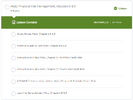
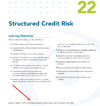
  • Using the example you provided, Structured Credit Risk is Malz, Chapter 9 in GARP's study guide, and is labeled as such in our study planner (see image). I just looked at the GARP eBooks, and they also state this at the bottom of the chapter's first page (see image).
1751914626107.png1751915007389.png
  • Updated Materials Forum Threads: These threads list the dates that we've published new or updated materials. FRM candidates purchase our study packages at different times throughout the year. We provide these lists to inform our customers about new updates. It is noted in the first post of that thread that "This thread contains information about the updated Part 2 materials for 2025 once they are published in the study planner. You will not see every chapter/reading in this list, as many were carried over from 2024 and did not need updates."
To clarify, not every chapter is included in these threads because some chapters did not require updates from the previous year and were already published in the study planner. You will only find updates listed. You can easily identify published materials by referring to the study planner, where the Topic, Chapter, and published materials are clearly labeled.​
 
Hi,
Please share if there is. a study planner with timelines?
Thank you.
@Shan09 BT is a self-study prep program, so we don't provide a specific timeline. The study planner is organized in the order of the GARP FRM curriculum (not the GARP eBooks). It allows you to study at your own pace, and you are not required to complete topics or chapters in a specific order.
 
Hi.
Due my slow laptop and considering it's quite old. I have installed vital source so that I can use the materials offline but then, I found out that there is no zoom option so I struggled to see the contents. Therefore I decided to print a chapter to pdf so that I can read comfortably offline. Now the pdf has a water mark warning me to not copy the material. I would like to know if what I did is a violation so that I would simply delete what I have already and try another way to study comfortably.
Thank you
 
Hi.
Due my slow laptop and considering it's quite old. I have installed vital source so that I can use the materials offline but then, I found out that there is no zoom option so I struggled to see the contents. Therefore I decided to print a chapter to pdf so that I can read comfortably offline. Now the pdf has a water mark warning me to not copy the material. I would like to know if what I did is a violation so that I would simply delete what I have already and try another way to study comfortably.
Thank you
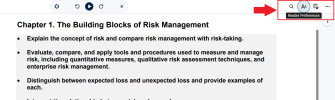
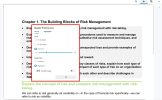
@Luncedo1 You haven't violated any rules. We publish our PDFs in VitalSource to protect our copyrighted materials. The watermark on the printout is to prevent the resale of our content. VitalSource offers various features, including zoom, that make it easier to view the content. When you are in VitalSource, you can find those options in the upper-right corner of the page. I hope this helps!

VitalSource Zoom 1.png

VitalSource Zoom 2.png
 
@Luncedo1 You haven't violated any rules. We publish our PDFs in VitalSource to protect our copyrighted materials. The watermark on the printout is to prevent the resale of our content. VitalSource offers various features, including zoom, that make it easier to view the content. When you are in VitalSource, you can find those options in the upper-right corner of the page. I hope this helps!

View attachment 4829

View attachment 4830
Thank you that helps a lot.
 
Top